How to Crop Desktop Wallpapers for Your Phone Screen
Stop wasting beautiful wallpapers! Learn how to perfectly crop any desktop wallpaper to fit your mobile screen in 3 simple steps.
🎯 The Problem
You found an amazing 4K desktop wallpaper (3840×2160), but when you set it as your phone background, your system crops it automatically—and cuts off the best part. The main subject ends up off-center, faces get cropped, or important details disappear.
Desktop wallpapers are designed for horizontal screens (16:9 or 21:9 aspect ratio), but your phone has a vertical screen (typically 19.5:9 or 20:9). When your phone's operating system tries to fit a horizontal image into a vertical screen, it has to crop heavily—and it doesn't know which part of the image matters most to you.
Without Our Tool
- Download desktop wallpaper
- Set as phone background
- System crops automatically
- Best part gets cut off
- No control over cropping
With Our Crop Tool
- Preview crop before download
- See exactly what will show
- Drag to reposition area
- Keep the important parts
- Perfect fit for your device
✨ The Solution: Interactive Crop Tool
Now you can crop desktop wallpapers for your phone—right from any device! Whether you're browsing on your laptop, tablet, or phone itself, our tool automatically detects your screen size and lets you preview and adjust the crop area before downloading.
Auto-Detection
Automatically detects your phone model and screen resolution
Live Preview
See exactly what will show on your screen before downloading
Drag to Adjust
Move the crop area to keep the most important parts
Perfect Quality
Downloads in full resolution optimized for your device
📖 How to Use: 3 Simple Steps
1Find Your Desktop Wallpaper
Browse our desktop wallpaper collection and find an image you love. Look for high-resolution wallpapers (1920×1080 or higher) for best results.
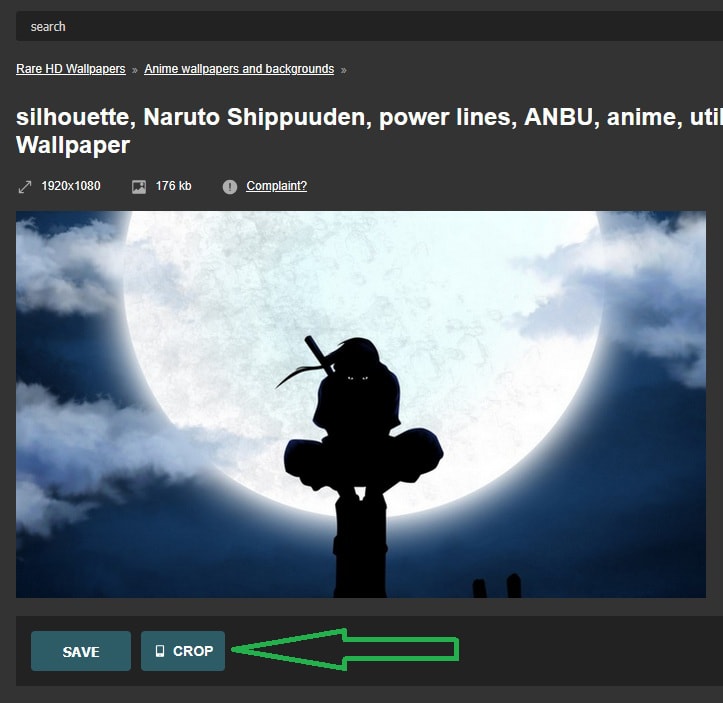
On the wallpaper page, you'll see three buttons: SAVE, OPEN, and CROP. Click the CROP button to start.
2Select Your Phone Resolution
📱 On Mobile (Automatic):
The tool automatically detects your phone's screen resolution and shows you a message like:
The crop area is already set to perfectly match your device! Just proceed to Step 3.
💻 On Desktop (Manual Selection):
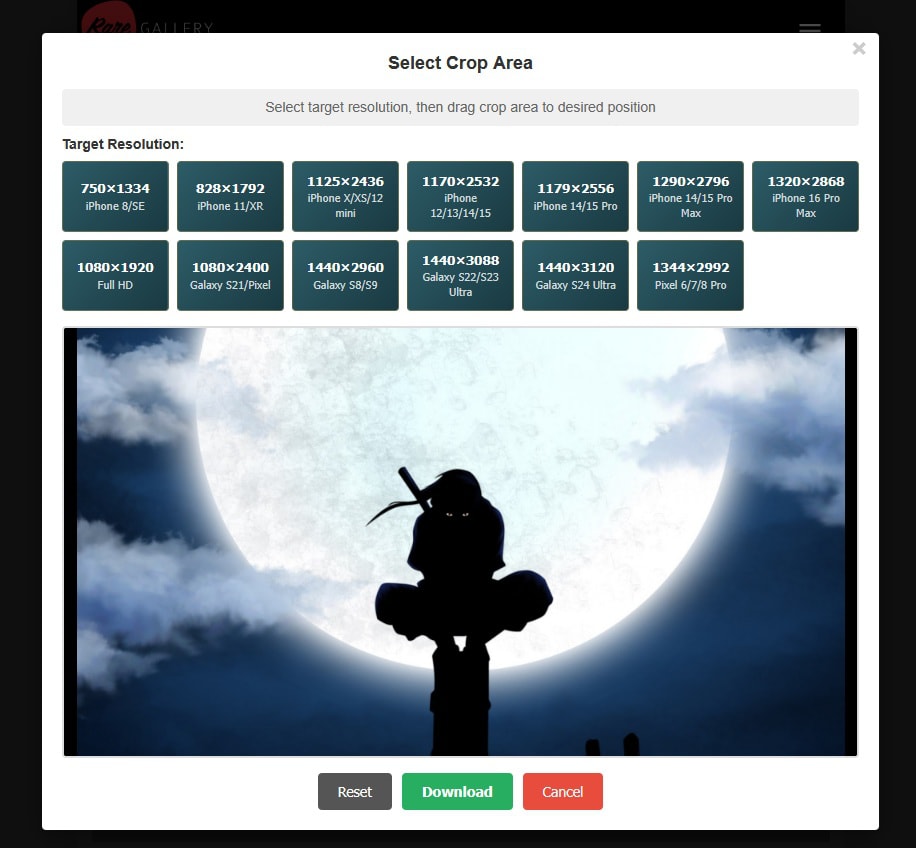
You'll see a grid of popular phone resolutions. Click the one that matches your phone:
- iPhone 15 Pro Max: 1290×2796
- iPhone 14/15: 1170×2532
- Galaxy S24 Ultra: 1440×3120
- Pixel 8 Pro: 1344×2992
- Standard Full HD: 1080×1920
3Preview, Adjust & Download
You'll see the wallpaper with a golden outlined rectangle showing exactly what will appear on your phone screen. The rest of the image is darkened.
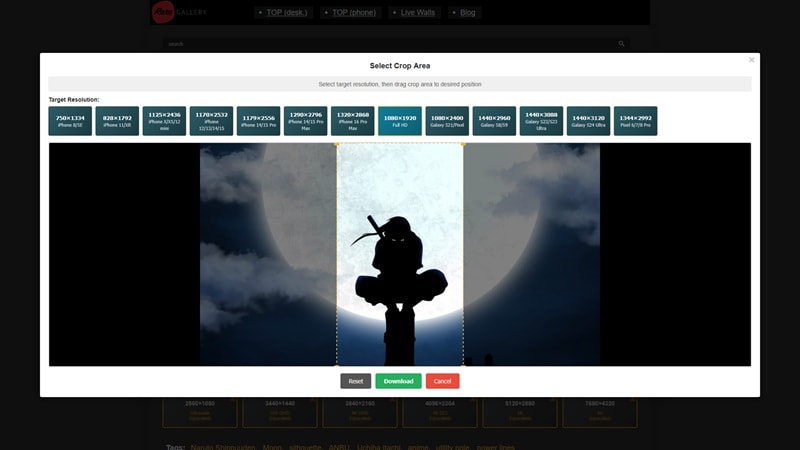
🎯 How to Adjust the Crop Area:
- Desktop: Click and drag inside the rectangle to move it
- Mobile: Touch and drag the rectangle to reposition
- Move it up, down, left, or right to frame the best part of the image
- The area inside the rectangle is what you'll see on your phone
⚙️ Control Buttons:
- Reset: Return crop area to center position
- Download: Save the cropped wallpaper to your device
- Cancel: Close the tool without downloading
When you're happy with the preview, click Download. The tool will save a perfectly cropped JPEG file named like cropped-wallpaper-1290x2796.jpg to your device.
🎨 Best Practices & Tips
✅ Choosing the Right Wallpapers
- Look for centered subjects: Wallpapers with the main subject in the center crop better
- Avoid edge-heavy designs: Important elements near left/right edges may get cut off
- High resolution is key: Start with 2560×1440 or higher for crisp results
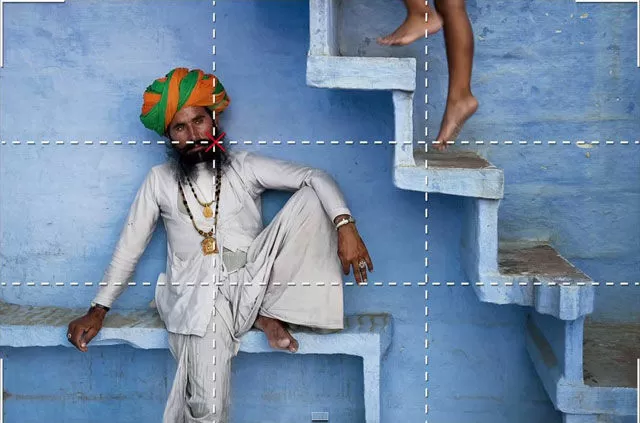
- Vertical space matters: Images with good vertical composition work best
📏 Resolution Selection Tips
- On mobile? Let the tool auto-detect—it's 95%+ accurate
- On desktop? Check your phone's specs or use these common sizes:
- Most iPhones (2020-2024): 1170×2532 or 1290×2796
- Most Android flagships: 1080×2400 or 1440×3200
- Budget/mid-range Android: 1080×1920
🖼️ Framing Tips
- Lock screen: Position subjects in upper 60% (clock/notifications cover bottom)
- Home screen: Consider icon placement—leave breathing room
- Portraits: Frame faces in the upper third
- Landscapes: Try to keep horizon lines visible
❓ Frequently Asked Questions
Q: Does this work on both iPhone and Android?
A: Yes! The tool supports 20+ resolutions covering iPhone (2020-2026 models), Samsung Galaxy, Google Pixel, OnePlus, and most other smartphones.
Q: Can I use this on my laptop to crop for my phone?
A: Absolutely! That's actually the best way. Browse desktop wallpapers on your laptop, crop them for your phone resolution, then transfer the file or email it to yourself.
Q: What if my phone's resolution isn't in the list?
A: Pick the closest match. The tool is flexible—even if it's not pixel-perfect, the aspect ratio will be close enough for great results.
Q: Does cropping reduce image quality?
A: No! The tool downloads at full resolution (95% JPEG quality). If anything, you're getting better quality than letting your phone's system crop it.
Q: Can I crop landscape/horizontal wallpapers for tablets?
A: Currently, the tool is optimized for phone resolutions (portrait orientation). Tablet support is coming soon!
Q: Is this free?
A: Yes, completely free! No registration, no watermarks, no limits.
🚀 Why This Changes Everything
Before this tool existed, you had two bad options:
- Download desktop wallpaper as-is → Phone crops it badly → Looks terrible
- Only use mobile wallpapers → Miss out on amazing desktop wallpapers
Now, with our interactive crop tool, the entire desktop wallpaper library is available for your phone. That's thousands of high-quality 4K and 8K wallpapers that were previously unusable on mobile devices.
The game-changer: You can browse desktop wallpapers from any device (laptop, tablet, or phone) and crop them for your phone screen—all without installing any software or apps. It's built right into the website.
🎉 Ready to Get Started?
Browse thousands of desktop wallpapers and crop them perfectly for your phone in seconds.
Browse Desktop Wallpapers →No signup required • Works on all devices • 100% free